
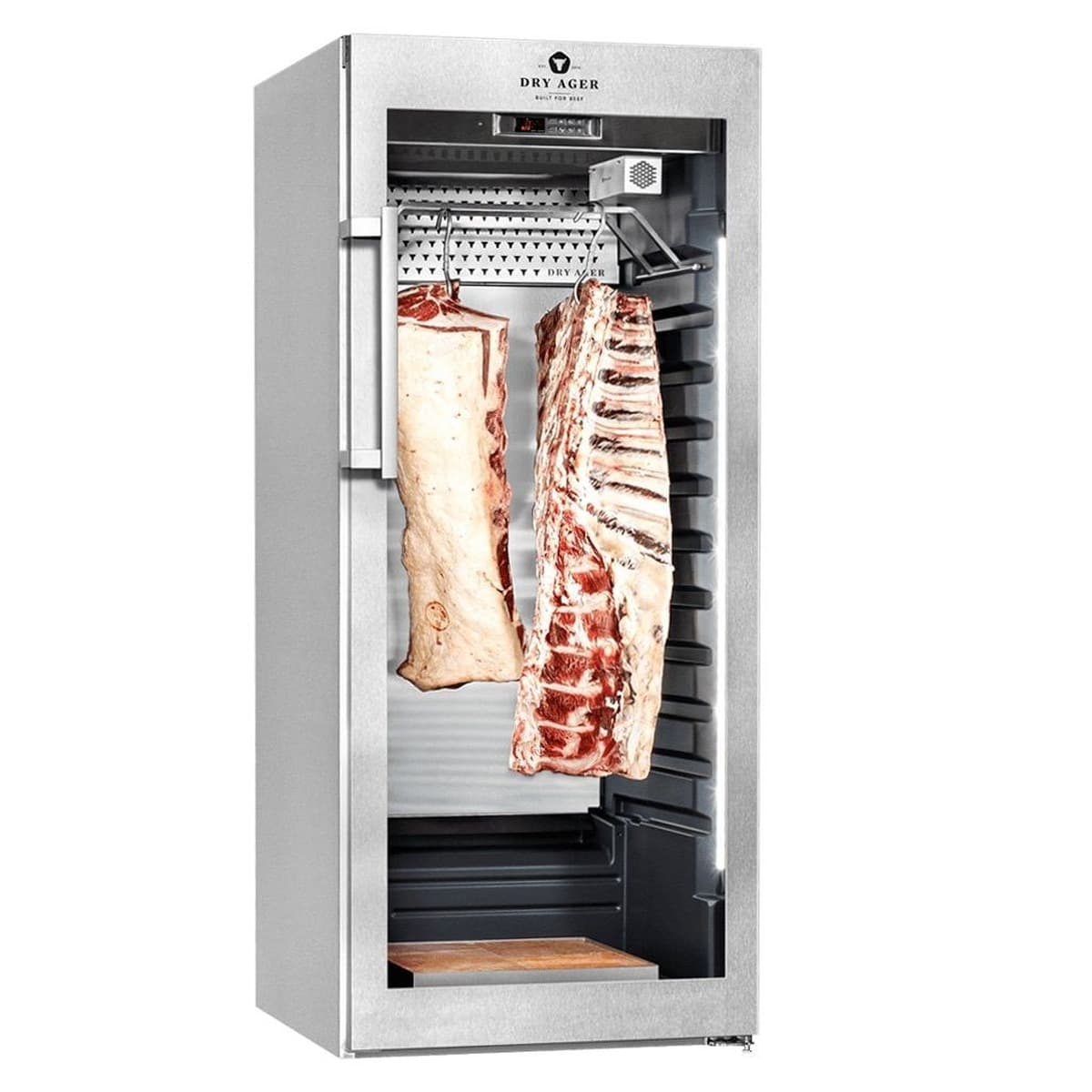
This guide walks you through installing, operating, and maintaining your Dry Ager cabinet, covering electrical requirements, standard and SmartAging modes, loading practices, cleaning steps, and troubleshooting error codes.
Key takeaways
- Dry Ager cabinets must be installed on a dedicated 15 A, 110-120 VAC grounded circuit with proper ventilation clearances.
- Always switch on UVC disinfection before dry aging and replace the bulb annually or when the UCC message appears.
- Standard mode starts at 34.7°F and 82% humidity, ideal for beef and pork; SmartAging programs automate the process.
- Load only cold-chain-maintained food, wait for the set temperature, and ensure air circulation around pieces.
- Clean the interior regularly with a soft cloth and mild detergent, and never use steam or abrasive cleaners.
Overview of dry ager cabinets and manuals
The Dry Ager cabinet line includes the UX 750 PRO and PRO S (models UX0750P, UX0750PS, UX0750PSP, UX750PRO), the UX 1500 PRO and PRO S (UX1500P, UX1500PRO S, UX1500PS, UX1500PSP), the UX 1550 PRO S with salt wall (UX1550PS, UX1550PSP), and the high production units UX 7000 and UX 8000. The Use and Care Manual for DRYAGER™ UX 1500 PRO S covers the larger PRO S cabinets, while the Use and Care Manual for DRYAGER™ UX 750 PRO S covers the smaller PRO S cabinets. The steps below come from the two PRO S manuals; for a UX 7000 or UX 8000 high production unit, check the documentation that ships with it.
For a visual overview of the cabinet's features, watch the video 'DRY AGER Advantages and functions summarized | DRY AGER'.
Installation and electrical connection
Before installation, examine the unit and packaging for shipping damage. The floor must be horizontal and level; use the adjustable feet to compensate for unevenness. Avoid placing the appliance in direct sunlight or near heat sources. Do not cover the ventilation openings. The manuals require a minimum distance of 1.97 in from the back of the appliance to the wall, and ventilation shafts must be at least the width of the appliance with a depth of at least 1.97 in. The appliance can be used free-standing or built-in; for built-in installations, follow the integration installation instructions in the manual.
The electrical connection must be made by a qualified, licensed electrician in accordance with local codes. Connect the appliance to a 15 amp, 110-120 VAC, grounded circuit protected by a circuit breaker or fuse. The manufacturer recommends a dedicated circuit to prevent overload. Do not use extension cords, ungrounded adapters, or power strips. The appliance is equipped with a three-prong grounding plug. The minimum ambient temperature at the installation site is 50°F, and for NSF compliance the ambient temperature must not exceed 86°F. The climate rating is 7, with a maximum ambient temperature of 95°F and maximum relative humidity of 70%. The appliance is not intended for outdoor use.
Switching on, lighting, and UVC disinfection
After connecting to power, press the power button once until the display switches on. The interior light can be turned on permanently by pressing the light button; the symbol appears in the display. When the door is open, the interior light turns on automatically. On the UX 1500 PRO S and similar larger cabinets, the interior light brightness can be adjusted with a screwdriver using the adjusting screw.
The UVC disinfection system must be switched on while dry aging food inside the appliance. Press and hold the UVC button for about 5 seconds until Led 2 lights up in the display. The UVC bulb needs to be replaced annually or when the display shows the warning message 'UCC'. Use only the original DRYAGER™ UVC bulb, item number DU0115, and follow the replacement instructions supplied with the new bulb.
Standard mode and SmartAging mode
The cabinet operates in two modes: Standard mode and SmartAging mode. In Standard mode, the display shows temperature and humidity. The factory setting at start-up is 34.7°F and 82% humidity, which is ideal for dry aging beef or pork. To activate Standard mode from a SmartAging program, press the program button and use the arrow button to decrease the program number until 'Std' is displayed; after a few seconds the standard mode starts automatically. Within Standard mode, you can select between 'dry' for dry aging and 'SAL' for ham and sausage production. The factory setting is 'dry'. To switch, press the button briefly, use arrows to select, and confirm.
To set the temperature, press and hold the temperature button for about 5 seconds until the setpoint flashes, use the arrow buttons to change the value, and press the button to confirm. The temperature range is 32°F to 86°F. To set the humidity, press and hold the humidity button for about 5 seconds until the setpoint flashes, adjust with arrows, and confirm. The humidity range is 40% to 90%.
SmartAging mode uses pre-programmed cycles for specific foods and taste intensities. Select the appropriate program using the program guide in the manual. Press the SmartAging button, use the arrow buttons to choose the program (displayed as 'PG' plus a number), and the program starts automatically after a few seconds. The display shows the current temperature and the program number. During SmartAging, the humidity value is not displayed. To check the remaining time, press the button; the displayed value multiplied by 10 gives the remaining hours. For programs without a runtime, '0.1' is shown. To end a program prematurely, activate Standard mode. The keypad can be locked by pressing and holding two buttons for 3 seconds; 'Pof' appears. Unlock with the same action; 'Pon' appears. The door can be locked with the key mechanism.
Loading and aging practice
Only use food that has been kept under a maintained cold chain and handled hygienically. For dry aging meat, the manual recommends fresh meat on the bone at a maximum of 5 days after slaughtering, or vacuum-matured meat up to 2 weeks (remove the foil before aging). Use half saddles or individual cuts of about 4-9 lbs on the bone. To minimize weight loss, choose meat with a thick protective layer of fat. For beef, a half saddle from a heifer with good fat cover and marbling is recommended.
Before loading, wait until the temperature setpoint is reached. When filling the cabinet, position the food pieces at a distance from each other to allow air circulation; prevent contact with each other and with the inner container. The food can be placed lying down or hanging. The humidity regulation functions properly only when the appliance is loaded with food. If using frozen meat, defrost it before placing it inside.
Aging times vary. In Standard mode, fresh beef typically ages for about 21-28 days, fresh pork for about 14-21 days, and vacuum-packed meat (foil removed) for up to about 14-18 days. SmartAging programs specify exact durations. During operation, check the food regularly. If you observe mold, an unusual smell such as a pungent or putrid odour, or other contamination, dispose of the food according to local regulations and clean the appliance thoroughly.
Cleaning and care
Clean the appliance regularly. Before cleaning, wear clean protective gloves. Remove all goods and store them in a cool place temporarily. Switch the appliance off, then disconnect the power cord or turn off the circuit breaker/unscrew the fuse. Remove the grid shelves, hanger, and tray.
The shelves, hanger, and tray can be cleaned in a dishwasher. For the interior, use a moist soft cloth or sponge with lukewarm water and a suitable detergent. Use the provided brush to clean corners and grooves in the grid shelf area on the sidewalls and the area of the bull's heads. Thoroughly dry all parts with a soft cloth. Repeat if necessary.
Clean the outside of the appliance with a clean, soft cloth. If needed, use a moist soft cloth with water and detergent. A good-quality stainless steel and glass cleaner can be used on the corresponding surfaces. Do not use abrasive sponges or abrasive cleaners containing acidic or chemical solvents. Do not use steam cleaning equipment. Ensure no detergent or water penetrates into the electrical parts or the ventilation panel. Do not damage or remove the type plate.
Error messages and troubleshooting
The display may show error messages accompanied by an acoustic alarm, which can be silenced by pressing any key. The messages include: P1 (air temperature sensor error) – cooling and heating are turned off; P2 (evaporator temperature sensor failure) – defrost occurs at fixed intervals; P3 (humidity sensor error) – humidity control is inactive; HA (high temperature alarm); LA (low temperature alarm); HHA (moisture-high alarm); LHA (moisture-low alarm); dA (door alarm) – door open for a prolonged time; UCC (UVC bulb lifetime reached). For P1, P2, and P3, contact the manufacturer's customer service department. The door alarm clears when the door is closed. For UCC, replace the UVC bulb.
If the appliance does not function, check that it is switched on, the plug is correctly inserted, and the fuse/circuit breaker is intact. Loud running noises may be caused by the appliance not standing firmly on the floor or by vibrations transmitted to nearby objects; noises from the refrigerant circuit are normal. If the displayed temperature is not low enough, verify the temperature setting, check the ventilation system, and ensure the appliance is not too close to a heat source. For any unresolved issues, contact the manufacturer's authorized service network. For questions about a specific model, ask Norpex.
Videos from the maker
Common questions
What is the factory temperature and humidity setting for Dry Ager cabinets?
- The factory setting at start-up is 34.7°F and 82% humidity, which is ideal for dry aging beef or pork. You can adjust these setpoints in Standard mode.
Do I need to turn on the UVC light every time I use the cabinet?
- Yes, the UVC disinfection must be switched on while dry aging food inside the appliance. Press and hold the UVC button for about 5 seconds until Led 2 lights up.
How often should I clean the cabinet, and can I use a steam cleaner?
- Clean the interior and exterior regularly. Do not use steam cleaning equipment, as it can cause injury or damage. Use a soft cloth with lukewarm water and mild detergent, and a dishwasher for the shelves, hanger, and tray.
What should I do if the display shows 'UCC'?
- The 'UCC' message means the UVC bulb has reached its lifetime. Replace it with the original DRYAGER™ UVC bulb (item no. DU0115) following the instructions supplied with the new bulb.
Can I age frozen meat directly in the cabinet?
- No. The manual says frozen meat must be defrosted before it goes into the cabinet, and to wait until the set temperature is reached before loading.