
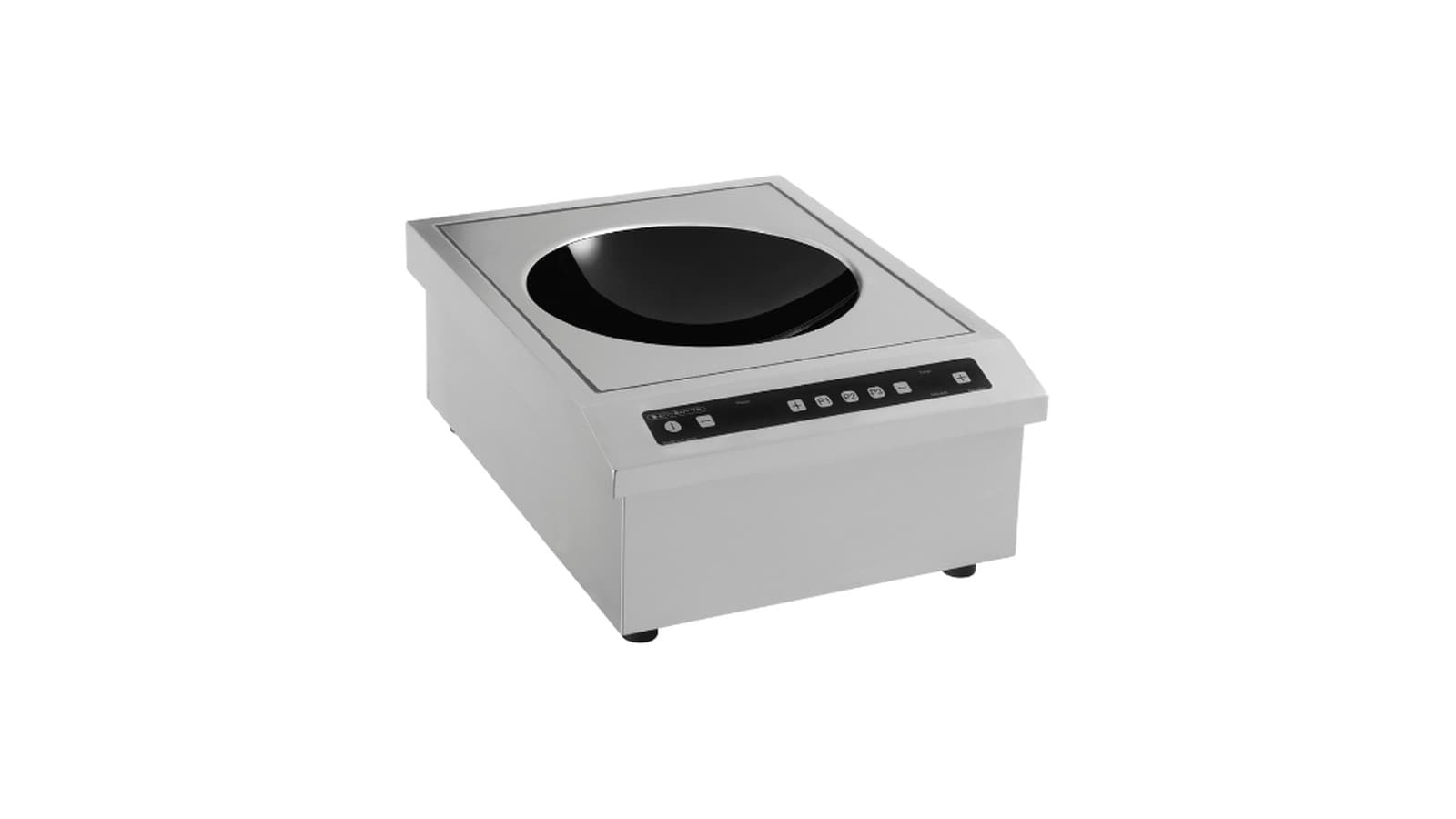
This guide explains how to operate, clean and troubleshoot Adventys induction hobs, woks and planchas using the steps and specifications from the manufacturer's user manuals.
Key takeaways
- Use induction-compatible pans at least 12 cm across: a flashing display means the pan is not recognised.
- Clean the air filter about once a week with soapy water or in the dishwasher, and put it back completely dry.
- A qualified, licensed electrician connects every unit to local code, sized from its rating plate.
- If the vitroceramic glass cracks, however slightly, disconnect the appliance at once and call for service.
- Ventilation that keeps running for a few minutes after switch-off is normal cooling.
Which user guide covers your Adventys model
Adventys provides separate user guides for different series in its induction line. The D2IC and D2IM double-zone countertop hobs are covered by the D2IM-6000 and D2IC-6000 user guide. The P4IM multi-zone plancha has its own dedicated manual, as does the MOP2i induction plancha.
The GLW induction wok is documented in the GLW 3000 and GLW 3500 user guide. The SK1i 650 and 700 range drop-in modules are covered by the SK1i 3600 user guide, while the SKGi 650 and 700 griddle modules are covered by the SKGi 6000 user guide. Each manual details the specific controls, power settings and connection requirements for that model.
Installation requirements from the manuals
All electrical work is for a qualified, licensed electrician, to local code. The user guides state each model's supply: the D2IM and D2IC hobs connect on a single-phase 208/240 V network; the GLW wok runs on single-phase 208/240 V (±10%), 50 or 60 Hz, drawing 13 or 16 A depending on the version; the SK1i module accepts 220-240 V single-phase or 360-440 V three-phase; the MOP2i and P4IM planchas run on three-phase lines, and each of the P4IM's two generators needs its own line protected by its own breaker with 30 mA earth-leakage protection.
The cable types and breaker curves printed in the guides are European specifications. In Canada the electrician sizes the supply and its protection from the rating plate of the unit you received, to local code.
For built-in models such as the D2IM and D2IC, the manual requires a 550 x 410 mm cut-out in the worktop and a seal between the stainless steel frame and the worktop. A fresh air inlet duct of 100 mm diameter must be connected to the back of the product, and the furniture must be ventilated. The P4IM manual requires a minimum cut-out of 745 x 745 mm and a silicone joint around the plancha frame using the supplied SOUDAL silirub HT°-A cartridge, with a 24-hour drying period before gradual heating.
Daily operation and controls
The D2IM uses control knobs, each with a power level display. To start, press and rotate a control knob left or right; the setting levels increment clockwise and decrement counter-clockwise. The power level ranges from 1 to 20. The D2IC uses a 6-key capacitive control with an ON/OFF button, plus and minus keys for power or temperature adjustment, and a timer. Its power setting ranges from 50 W to 3000 W, and temperature setting ranges from 30 °C to 140 °C in 1 °C steps and from 140 °C to 250 °C in 5 °C steps.
The GLW induction wok is switched on by pressing the ON/OFF touch; the display shows '0' until power is sent. Power levels range from 1 to 20, with the GLW 3000 reaching 3000 W at level 20 and the GLW 3500 reaching 3500 W. A timer can be set between 1 and 99 minutes by pressing the timer touch and adjusting with plus and minus keys. When the timer ends, power stops and the product switches off automatically.
The SK1i module starts in power mode (W) when the control knob is pressed and turned. The power level ranges from 25 W to 3600 W. Pressing the 'T°' button switches to temperature mode, adjustable between 30 °C and 250 °C. The SKGi griddle module uses two rotary controllers for its two zones, with temperature adjustable from 60 °C to 250 °C in 10 °C steps.
The MOP2i plancha has two cooking zones, each adjustable between 60 °C and 250 °C. The temperature display flashes until the desired temperature is reached. The P4IM plancha has four independent zones, each controlled by a 360° knob with a 4-digit display for temperature setting between 60 °C and 250 °C.
All models display a flashing indicator if no pan is present or if the pan is incompatible with induction technology. When a compatible pan is placed on the zone, the display shows the setting level permanently. After removing a pan, an 'H' may flash on the GLW display as long as the vitroceramic glass temperature exceeds 60 °C.
Recommended cookware
Adventys induction appliances recognize the majority of pans. The user guides list compatible materials: enamelled steel pans with or without a non-stick coating, stainless steel pans designed for induction, cast-iron pans with or without an enamelled base, and aluminium pans with special bases. A simple test is to place the pan on the cooking zone with a power level set; if the indicator stays on, the pan is compatible. If it flashes, the pan cannot be used. A magnet that sticks to the base also confirms compatibility.
Pans made from glass, ceramic, clay, aluminium without a special base, copper, and certain non-magnetic stainless steels are not compatible. The GLW wok guide specifies that only wok-type recipients with a curvature adapted to the ceramic bowl should be used, and flat-bottomed recipients must not be used on the wok cooktop. Pans must rest on the stainless steel collar bordering the wok glass to avoid shocks.
Cleaning and routine care
All Adventys user guides emphasize cleaning the air filter approximately once a week. The D2IM/D2IC and GLW manuals state that the filter placed under the device should be cleaned with soapy water or in the dishwasher and put back very dry before any use. The SK1i and SKGi manuals describe removing the front panel cover, which is held by magnetic attachment, lifting the filter upward, cleaning it with warm soapy water or in the dishwasher, and drying it thoroughly before reassembly.
For the vitroceramic glass, the guides give a cleaning table. Light spots: wet the area well with hot water and wipe with a sponge. Burnt-on spots: soften them with hot water, lift them with a glass scraper, finish with the scouring side of a sponge and wipe. Limescale rings and marks: apply hot spirit vinegar, let it act and wipe with a soft cloth. Melted sugar, aluminium or plastic: use a vitroceramic glass cleaner, preferably one containing silicone, which leaves a protective film.
The MOP2i plancha manual adds that the filter on the front and bottom of the unit should be cleaned weekly with soapy water or in the dishwasher and put back dry. The P4IM plancha manual describes a hot cleaning procedure: after the four areas are cut, wait a few minutes for the surface temperature to drop below 200 °C, pour water or ice cubes on the still-hot surface to loosen fat, use the supplied spatula to scrape fat into the collection tray, then wipe with a sponge or absorbent paper.
The SKGi griddle module has a grease evacuation system with a drip drawer that must be emptied and cleaned regularly so it does not overflow. Never use a steam cleaner on these appliances and never clean them with large amounts of water; the guides suggest a little household alcohol instead.
Troubleshooting common issues
The user guides include troubleshooting tables for situations where the appliance does not function as expected. If the device does not work and the display stays off, the cause may be a defective supply or connection; the operator should inspect fuses and the circuit breaker of the electrical installation. If the installation short-circuits when putting the device into service, the connection should be verified.
If 'F7' appears on the display, the electric circuits are overheating; the operator should inspect the ventilation of the device and check if it is operational. If another error code appears, the electric circuits are not working correctly and the after-sales service should be called. A flashing 'F-' indicates a touch activated permanently on the control keyboard; if the fault does not disappear, call the after-sales service.
If the selected indicator continues to flash after switching on and starting the cooking zone, the pan is either incompatible with induction technology or has a diameter smaller than 12 cm. The operator should consult the cookware recommended section. A pan making noise during cooking is a normal vibration caused by current circulation in some types of pans and poses no danger.
A new device may release a smell during the first cooking sessions. The manuals recommend running the cooking for half an hour with a pan full of water. Ventilation that continues for a few minutes after stopping the device is normal cooling behaviour. If the vitroceramic hob suffers a breakage, split or crack, no matter how small, the appliance must be disconnected immediately and the after-sales service contacted.
The SK1i and SKGi manuals also list specific error codes. F3 indicates a vitro temperature sensor in short circuit, F4 indicates the sensor is cut or missing, F5 and F6 relate to electronic temperature sensor issues, and F8-13 or F8-14 indicate fan problems. For any of these, the after-sales service must be called. F8-29, a hardware electronic security fault, can be acknowledged by pressing the ON/OFF key or disconnecting and reconnecting the product; if the error persists, call the after-sales service.
Service and repairs
The user guides reserve repairs for a qualified technician approved by Adventys, using only original spare parts. If the mains cable is damaged, it must be replaced by the manufacturer, its after-sales service or a similarly qualified person.
When you ask for service or parts, give the appliance type and serial number from the plate fixed under the metal casing. Anything beyond the checks in the troubleshooting tables goes to the manufacturer's authorized service network.
Common questions
What type of cookware works with Adventys induction hobs?
- Use enamelled steel, induction-designed stainless steel, cast iron, or aluminium pans with special bases. Test by placing the pan on the zone with a power level set; if the indicator stays on, it is compatible. Glass, ceramic, clay, copper and non-magnetic stainless steel are not compatible.
How do I clean the vitroceramic glass surface?
- Wipe light spots with hot water and a sponge. Lift burnt-on spots with a glass scraper after softening them with hot water, then finish with the scouring side of a sponge. Remove limescale rings with hot spirit vinegar, and melted sugar, aluminium or plastic with a vitroceramic glass cleaner, preferably one with silicone.
Why does the display flash when a pan is on the cooking zone?
- A flashing display means the pan is either not compatible with induction technology or has a diameter smaller than 12 cm. Refer to the cookware recommended section in the user guide and test with a magnet or a compatible pan.
What should I do if an error code appears on the display?
- F7 means the power electronics are overheating: let the unit cool and check that its ventilation works. F3 to F6 are temperature-sensor faults and F8-13 or F8-14 fan faults, all for the after-sales service. F8-29 can be acknowledged with the ON/OFF key; if it comes back, call the after-sales service.
How often should I clean the air filter?
- The user guides recommend cleaning the air filter approximately once a week with soapy water or in the dishwasher. The filter must be put back completely dry before using the appliance again to protect it from dust and grease.